
Traditional product photography drains thousands of dollars per day and extends development timelines by several weeks. While generic text-to-image tools promise a shortcut, their inability to maintain product fidelity across variations leaves marketing teams with unusable digital noise. A modern product visual workflow delivers fast, listing-ready renders without sacrificing item accuracy or commercial rights. SHBD Metal bridges this digital divide by connecting rapid visual ideation directly to engineering feasibility reports and manufacturing execution.
Summary of the Best AI Product Photography Tools
| Tool Name | Best For | Core Output | Image Quality | 3D Capability | Export Formats | Commercial Use | Pricingtier |
| SHBD Metal AI Creator | Concept-to-Production | 2D & 3D Models | High (Production) | Yes (STL/GLB) | JPG, STL, GLB | Yes | Free-tier |
| Nightjar | Catalog Consistency | 2D Images | Very High | No | JPG, PNG | Yes | ~$0.10/image |
| Photta | All-in-One E-commerce | 2D Images | High | No | JPG, PNG | Yes | Credit-based |
| Photoroom | Mobile Sellers | 2D Images | Medium | No | JPG, PNG | Yes | $9.99/mo |
| Claid.ai | API Automation | 2D Images | High | No | JPG, PNG | Yes | $9.00/mo |
| Flair AI | Custom Scenes | 2D Images | High | No | JPG, PNG | Yes | $10.00/mo |
| Pebblely | Low-Cost Testing | 2D Images | Medium | No | JPG, PNG | Yes | $19.00/mo |
AI Product Photography Tools Deep Dives
SHBD Metal AI Creator – Best for Hardware Teams and Concept-to-Production Workflows
SHBD Metal AI Creator generates production-ready visuals and converts them directly into usable 3D models. Users can input text descriptions or upload reference sketches to generate accurate 2D renders. From there, the platform can extract GLB or STL files specifically intended for engineering and physical evaluation.
Unlike basic aesthetic tools, it connects visual design directly to actual manufacturing validation. After generating a 3D model, users can immediately request a Preliminary Product Feasibility Report. This report evaluates structural risks, wall thickness, and recommends specific manufacturing processes like CNC machining or 3D printing. It successfully bridges the gap between digital ideation and physical production.
Key Specs:
- Output type: 2D renders, GLB, and STL files.
- Input formats: Supports text prompts and reference images.
- Workflow capability: Integrates directly with manufacturing feasibility evaluation.
- Export formats: STL for 3D printing/prototyping, GLB for visual review.
- Price tier: 20 points for 2D rendering, 16 points for 3D model generation.
Pros:
- Transitions seamlessly from 2D images to 3D engineering files.
- Provides automated DFM (Design for Manufacturing) insights.
- Estimates real-time costs and lead times for physical parts.
- Generates STL files specifically for rapid prototyping.
Cons:
- Focused strictly on physical products, not digital art or abstract concepts.
- Requires a credit system for advanced engineering reports.
Nightjar – Best for Catalog Consistency
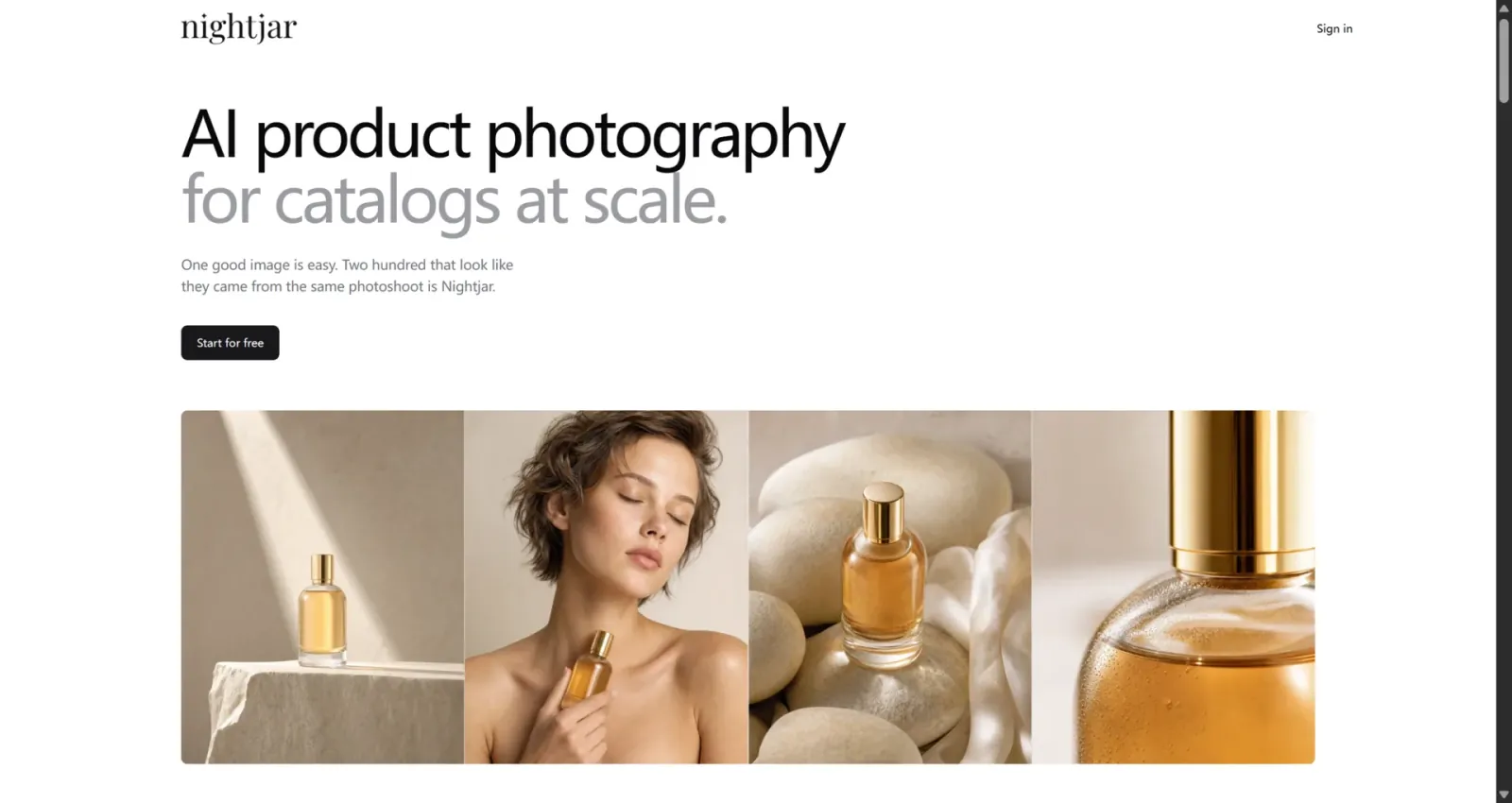
Nightjar locks in visual norms by saving lighting and composition templates as reusable generation recipes. This guarantees uniform visuals across an entire product catalog without manual prompting for every item. It effectively eliminates visual drift, making it one of the best ai product photography tools for ecommerce brands.
However, Nightjar generates purely 2D pixels without any structural data. When your team needs to transition from a visual concept to a physical prototype, these images lack the dimensional accuracy required for engineering. At this stage, teams must move to a platform like SHBD Metal to translate these flat concepts into manufacturable 3D CAD files.
Key Specs:
- Output type: 2D images.
- Batch support: Yes, highly optimized for large catalogs.
- Commercial usage: Fully cleared for commercial use.
- Price tier: Subscription based, roughly $0.10 per image.
Pros:
- Maintains strict visual consistency across hundreds of SKUs.
- Preserves exact fabric textures and logo details without distortion.
- Outputs natively comply with Amazon main image requirements.
Cons:
- No 3D modeling or export capabilities.
- Lacks the engineering data necessary for physical manufacturing.
Photta – Best for All-in-One E-commerce Workflows
Photta provides five standardized e-commerce workflows, including pure white backgrounds, lifestyle scenes, and hand-held scale references. It outputs high-resolution images in seconds, making it an ideal ai product photography tool for Shopify sellers and marketing teams. The platform also offers specific rendering modules for complex categories like jewelry and apparel.
While excellent for online merchandising and rapid A/B testing, Photta cannot export 3D data or assess manufacturing feasibility. For teams preparing a new hardware product for launch, visual appeal is not enough. You need the Preliminary Product Feasibility Report provided by SHBD Metal to verify if the design can actually be manufactured.
Key Specs:
- Output type: 2D images and short video derivatives.
- Editability: Modular workflow with zero prompt engineering required.
- Export formats: JPG, PNG.
- Price tier: Credit subscription (5 credits for 2 HD images).
Pros:
- Extremely easy to use with predefined templates.
- Strong detail retention for text and logos.
- Covers all standard e-commerce image requirements.
Cons:
- Strictly cloud-based with no offline capabilities.
- Cannot bridge the gap to physical product development.
Photoroom – Best for Mobile and Marketplace Sellers
Photoroom excels at fast background removal and applying marketplace-compliant templates directly from a mobile device. It is a highly efficient product photography ai tool free option for basic daily operational tasks. Sellers can shoot a product in a warehouse and immediately edit it for Amazon or Etsy.
The tool is limited to basic 2D scene replacement and struggles with realistic lighting on complex reflective surfaces. If your product requires physical validation or small-batch manufacturing, Photoroom offers no technical support. You must transition to manufacturing services like SHBD Metal to handle actual production requirements.
Key Specs:
- Output type: 2D images.
- Integration: Direct Shopify integration.
- Batch support: Yes, for background removal.
- Price tier: Free basic version, Pro at $9.99/month.
Pros:
- Industry-leading mobile application experience.
- Zero learning curve for immediate use.
- Massive library of compliant marketplace templates.
Cons:
- AI backgrounds can look artificial on complex products.
- Provides zero data for product engineers or designers.
Claid.ai – Best for API Automation
Claid.ai integrates directly into enterprise ERP systems to process thousands of images automatically. It handles background removal, upscaling, smart cropping, and color correction without manual intervention. This makes it a top choice for massive platforms and agencies managing tens of thousands of SKUs.
This automation is strictly for digital image processing and presentation. Hardware startups needing to manufacture actual physical products will find Claid.ai insufficient for their core needs. They should use SHBD Metal to bridge the gap between digital asset generation and physical prototyping.
Key Specs:
- Output type: 2D images.
- Integration/API: Deep API access for enterprise systems.
- Batch support: Unmatched automated batch processing.
- Price tier: Starts at $9.00/month.
Pros:
- Runs automatically in the background for massive catalogs.
- Forces the retention of critical brand elements.
- Drastically reduces manual editing hours.
Cons:
- Requires technical expertise to set up API integrations.
- Manual scene adjustments are tedious.
Flair AI – Best for Custom Scene Construction
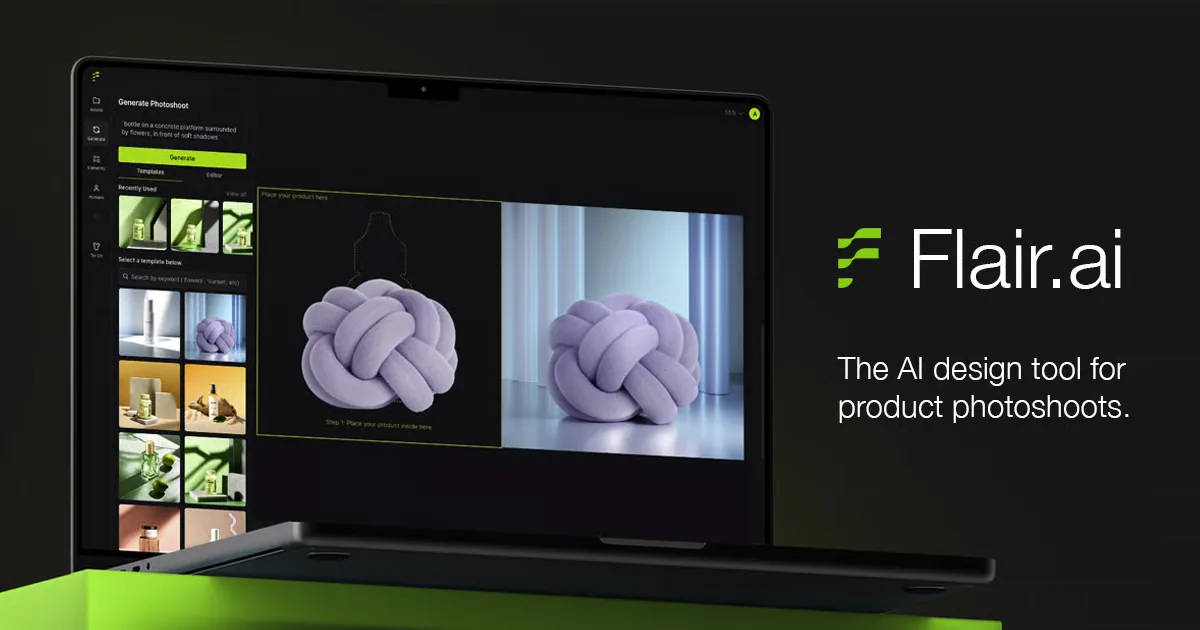
Flair AI offers a drag-and-drop canvas for the precise placement of 3D props and manual lighting adjustments. It provides high compositional freedom, making it one of the best ai tools for product photography when planning creative marketing campaigns. Users can build distinct visual environments rather than relying on static templates.
This flexibility comes with a steep learning curve and offers no pathway to physical product engineering. Once the visual design is approved, teams must shift away from graphic tools. They need SHBD Metal to handle the material selection, tolerances, and CNC machining required for a real-world product launch.
Key Specs:
- Output type: 2D images.
- Editability: Drag-and-drop 3D prop placement.
- Team collaboration: Real-time team editing supported.
- Price tier: Pro version at $10.00/month.
Pros:
- Top-tier compositional freedom for art directors.
- Excellent for building high-end brand visuals.
- Supports custom model training on higher tiers.
Cons:
- Reflective materials and small text often warp.
- Cannot export the 3D props or designs as physical CAD files.
Pebblely – Best for Low-Cost Testing

Pebblely provides a budget-friendly entry point for users wanting to test AI image generation. It offers 40+ preset themes for one-click background replacement and basic shadow generation. It serves well as a product photography ai tool free trial for small Etsy shops or solo founders.
Because it operates entirely on rigid templates, users cannot control specific lighting angles or complex material reflections. It is purely a cosmetic tool. When a hardware startup needs to move from a visual mockup to a functional prototype, Pebblely is entirely obsolete, and a transition to a manufacturing partner like SHBD Metal is mandatory.
Key Specs:
- Output type: 2D images.
- Editability: Template-based background replacement.
- Commercial usage: Yes.
- Price tier: 40 free images monthly; Basic at $19.00/month.
Pros:
- Very generous free tier for beginners.
- No prompt engineering required.
- Fast generation for basic social media posts.
Cons:
- Extremely low freedom for custom compositions.
- Poor handling of highly reflective objects.
From AI Design to Real Production
Generating a photorealistic image of a product is only the first step in hardware development. AI image generators create a surface-level illusion of a product; they do not understand physics, assembly logic, or material science. These visual tools lack the critical data required for manufacturing, such as wall thickness, draft angles, and precise dimensional tolerances.
To turn an AI concept into a real physical product, you must transition from pixel data to engineering data. Physical production requires CAD models that account for structural integrity and manufacturing constraints. An AI might draw a beautiful plastic housing, but it won’t tell you if that housing can actually be ejected from an injection mold.
SHBD Metal AI Creator bridges this exact gap. Instead of leaving you with an unusable image, it generates 3D STL files for prototyping and initiates a Preliminary Product Feasibility Report. Our engineers review the AI-generated design to assess structural rationality and manufacturing risks. We then recommend the most cost-effective transition to reality, whether through CNC machining, 3D printing, or injection molding, complete with accurate cost and lead time estimates.
Buying Guide: 5 Factors to Choose Your AI Photography Tool
1. Catalog Size and Batch Needs
Your SKU count directly determines which tier of tool you need. Single-digit catalogs work fine with Pebblely or Photoroom. Fifty to 200 SKUs need Photta or Nightjar for consistency. Catalogs over 10,000 SKUs require Claid.ai’s API automation — manually processing that volume through any GUI-based tool becomes unworkable within a quarter.
2. Product Category Complexity
The most important factor most buyers overlook. Jewelry with polished metal surfaces, knit textiles with fine stitch patterns, clear glass containers, and products with small printed text all trigger AI hallucination more frequently than solid-color, matte-finish items. Nightjar and Photta handle these better than generalist tools. Fibbl’s physical 3D scanning is the only option that eliminates hallucination entirely for footwear and bags.
3. Visual Consistency Across Your Catalog
If your Amazon store or Shopify collection shows 30 products and each one has slightly different lighting temperature, shadow direction, and color saturation, customers perceive your brand as less professional — even if they cannot articulate why. Nightjar’s Recipe system is the only tool purpose-built to solve this across a full catalog. Photta’s reference-image locking is the second-best option.
4. Integration and Workflow Depth
Solo sellers and small teams benefit from all-in-one platforms like Photoroom (mobile → Shopify publish). Larger teams with existing tech stacks should evaluate API depth: Claid.ai for ERP/inventory integration, Adobe Firefly for Creative Cloud pipeline compatibility. Agencies managing multiple client brands need Claid.ai’s brand-model training or Photta’s multi-workflow switching.
5. Budget and Free-Tier Testing Path
Start with free tiers to validate that AI photography works for your specific products before committing. Pebblely (40 free images/month, no credit card) and Photoroom (daily free export) provide enough volume to test 2–3 products across multiple scene types. Use this testing phase to identify which tools handle your product category well before upgrading.
Technical FAQ
No. High-end brand campaigns and highly complex materials, such as precision jewelry or irregular transparent parts, still require physical photography. AI is best deployed for high-volume listing images, rapid A/B testing, and concept visualization. A hybrid approach of base photography expanded by AI is the industry standard.
Yes, provided the image accurately represents the physical product. You must not use AI to fabricate features, alter physical dimensions, or misrepresent materials. Using tools trained on compliant data ensures you avoid copyright and platform policy violations.
You must use a tool that supports saved templates, visual recipes, or fixed prompt structures. Manually re-typing prompts for every image will always result in visual drift. Tools designed for e-commerce allow you to lock lighting and camera angles globally.
AI struggles severely with highly reflective jewelry, transparent glass or plastic containers, thin knitted fabrics, and small printed text. These items frequently trigger AI hallucinations resulting in warped geometry. For these specific categories, it is safer to rely on physical photography or precise 3D CAD rendering.

Comment
0 comments
Got thoughts or experiences to share? We’d love to hear from you!