
Do you have a concept in mind but no idea what the final physical product would actually look like? Designing a piece of hardware from scratch is incredibly challenging, yet thanks to the rapid advancement of AI technology, you can now validate your product ideas instantly. Today, we review some top-tier AI product design tools designed to help us avoid the “concept-only” trap and quickly transform creative ideas into tangible, market-ready products.
Comparison Summary Table
| Tool Name | Core Output | Image Quality | 3D Capability | Editing Controls | Export Formats | Pricing |
| SHBD Metal AI Creator | Photorealistic Product Images, PRD Spec Sheets, 3D Models | High (Production Accuracy) | Native (GLB, STL Output) | Prompt, PRD Attributes, Multi-Angle Sync | PNG, PDF (PRD), GLB, STL | Credit-Based (Daily Free Tier Available) |
| UX Pilot AI | Screen Wireframes, High-Fidelity UI, Code | High (UI Layouts) | None | Component-Level & Regional Redraw | Figma Plugin, HTML/CSS Source | Free Tier; Paid $19–$39/user/mo |
| Midjourney | Artistic Images, Moodboards | Very High (Stylized/Artistic) | None | Inpainting, Panning, Aspect Ratio | PNG, WEBP | Paid Tiers $10–$120/mo |
| Vizcom | Rendered Concepts from Hand Sketches | High (Rendered ID Sketches) | None | Layer Weight, Live Sketching Brush | PNG, JPG, PSD Layers | Free Tier; Paid $15–$49/user/mo |
| Meshy | Untextured/Textured Mesh Assets | Medium | Native (Mesh Generation) | Prompt Refinement, Texture Editing | OBJ, FBX, GLB, USD | Free Tier; Paid $20–$60/mo |
| Lovable | Interactive Web Apps, Frontend UI | Medium (Standard Web UI) | None | Natural Language Code/UI Edits | GitHub Sync, Live Web Deployment | Free Tier; Enterprise $50/mo |
| Webflow AI | Visual Web Components, CMS Pages | High (Web Layouts) | None | Visual Drag-and-Drop, Layout Styling | Live Web, Custom Code Export | Free Tier; Paid $14–$39/mo |
| Uizard | Screen Flow Schematics, Low-Fi Prototype | Medium | None | Preset Component Styling | PNG, PDF, Figma Export | Free Tier; Paid $12–$39/mo |
Top AI Tools for Product Design Deep Dives
SHBD Metal AI Creator – Best for Commercial Product Visuals & Manufacturing Readiness
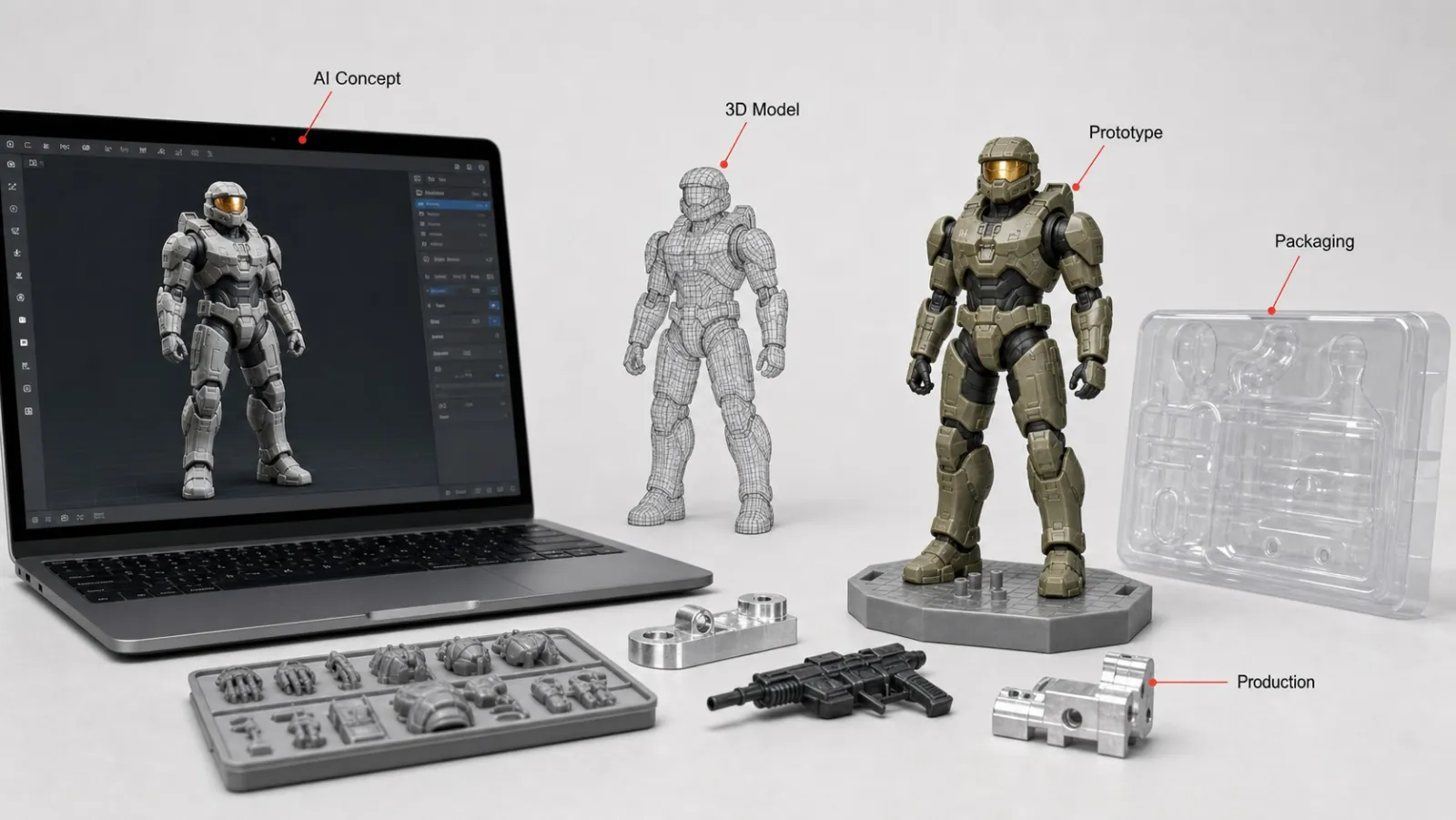
SHBD Metal AI Creator addresses a persistent challenge in hardware development: bridging digital visualization and physical production. Unlike general image generators that prioritize artistic flair over spatial accuracy, this platform generates realistic product images designed specifically for commercial evaluation. It guides teams through defining product requirement specifications (PRDs), aligning form factor, material aesthetics, and core functional needs.
The software converts verified 2D visual outputs into 3D geometries, providing GLB files for interactive web presentation and STL files for direct prototyping. Because it connects directly to SHBD Metal’s digital manufacturing ecosystem, users can request engineering feasibility reviews and preliminary DFM (Design for Manufacturability) analysis right from their project dashboard. This workflow allows product teams to transition from initial concept images to CNC machining, 3D printing, sheet metal fabrication, or injection molding without restarting the design cycle.
- Output type: Photorealistic product visuals, structured PRD documents, GLB/STL 3D models.
- Editability: Attribute-based PRD editing, prompt refinement, multi-view asset generation.
- Export formats: PNG, PDF, GLB, STL.
- Commercial usage: Full commercial usage rights included on generated outputs.
- Batch support: Generates four multi-angle visual variants per execution cycle.
- Integration/API: Connected to SHBD Metal digital manufacturing quotes and engineering review backend.
- Price tier: Free daily allowance (100 credits); scalable credit packages for commercial teams.
Pros:
- Generates product-focused imagery with consistent lighting and material definition across multiple angles.
- Outputs manufacturing-friendly STL files alongside GLB presentation models.
- Direct access to engineer-backed DFM reports and real-world production quotes.
- Integrates PRD documentation drafting directly into the visual generation process.
Cons:
- Focused strictly on physical product design rather than mobile app UI screens.
- Requires completing structured engineering specs for full manufacturing feasibility reviews.
UX Pilot AI – Best for End-to-End UI/UX Wireframing & Design System Mapping
UX Pilot AI accelerates digital product workflows by translating text prompts into complete user interface screen flows. The platform generates structured wireframes and high-fidelity layouts while organizing information hierarchy logically. Its deep integration with Figma allows product managers to import custom design systems, ensuring generated components automatically adopt company typography and color palettes.
The software supports regional AI redrawing and modular interface adjustments, allowing designers to refine individual components without breaking the broader user flow. Outputs can be exported as source code, easing the transition from initial wireframe review to developer kickoff. This focus makes it a solid option for software product teams managing complex user journeys.
- Output type: Low-fidelity wireframes, high-fidelity UI screens, frontend code snippets.
- Editability: Modular page editing, regional AI redraw, Figma token mapping.
- Export formats: Figma files, HTML/CSS source code.
- Commercial usage: Commercial rights depend on the selected subscription tier.
- Batch support: Generates complete multi-screen user flows in a single run.
- Integration/API: Native Figma plugin synchronization.
- Price tier: Free plan (up to 7 screens per generation); Standard from $19/month.
Pros:
- Maintains consistent design token structure across full application flows.
- Native Figma plugin allows seamless editing within existing design team workflows.
- Generates clean code exports for rapid developer handoff.
Cons:
- Cannot generate physical product imagery, CAD files, or 3D geometries.
- Blank canvas generations can occasionally yield sparse layout spacing.
Midjourney – Best for Early Concept Moodboards & Visual Exploration
Midjourney remains a leading option for aesthetic ideation, generating detailed artistic visuals from natural language prompts. It excels during the fuzzy front-end of product development, helping teams explore material textures, lighting environments, and stylistic directions. Industrial designers frequently use it to compile moodboards and pitch visual concepts to internal stakeholders.
However, Midjourney operates primarily as an artistic creation tool rather than an engineering utility. It lacks spatial awareness, precise dimensional scaling, and multi-angle view consistency. While it produces impressive visuals for marketing presentations, turning those images into buildable CAD geometry requires rebuilding the product from scratch in dedicated engineering software.
- Output type: Stylized 2D raster imagery, visual moodboard concepts.
- Editability: Region-specific inpainting, image panning, aspect ratio controls.
- Export formats: PNG, WEBP.
- Commercial usage: Granted to active paid subscribers.
- Batch support: Renders four image variations per prompt.
- Integration/API: Discord interface; third-party web access integrations.
- Price tier: Paid tiers range from $10 to $120/month.
Pros:
- Unmatched surface texture quality, lighting realism, and aesthetic style variety.
- Great for rapid visual moodboard creation during early ideation.
- Active user community with extensive prompt sharing.
Cons:
- No native understanding of physical dimensions, tolerances, or assembly logic.
- Inconsistent output across multi-view variations of the same product.
- Cannot output 3D geometry or engineering specifications.
Vizcom – Best for Industrial Design Sketch Rendering & Shading
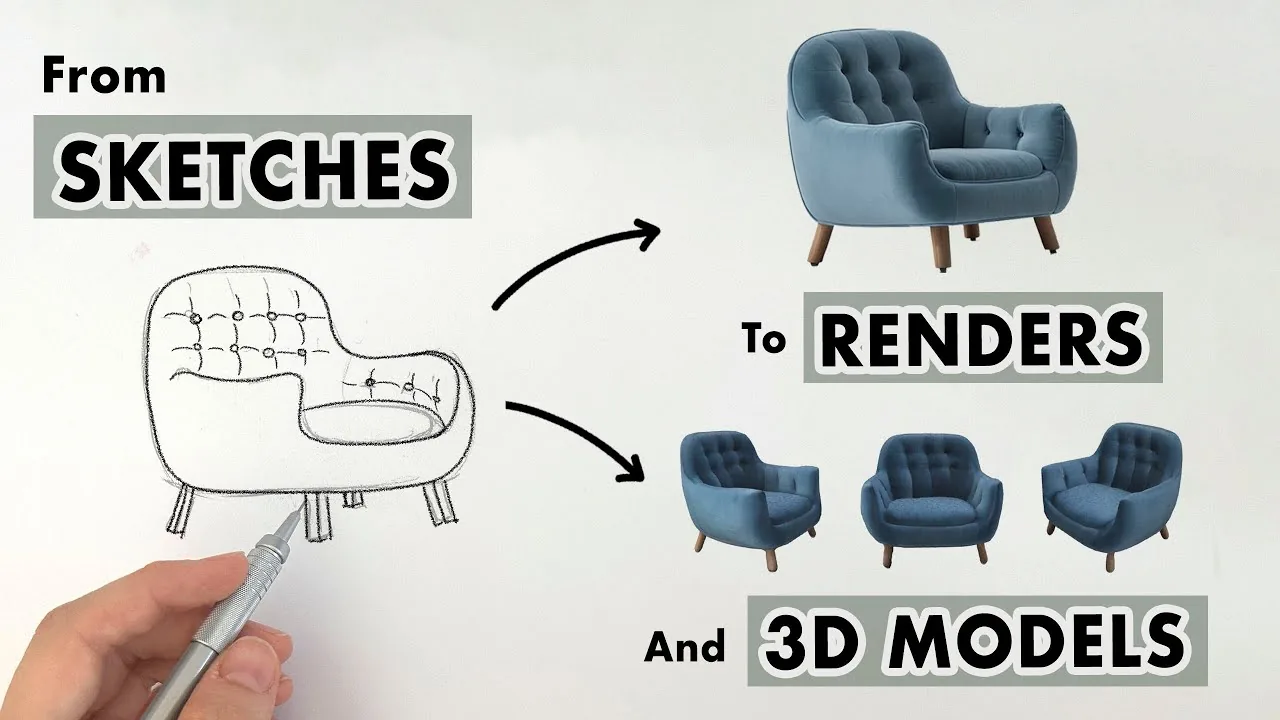
Vizcom bridges hand-drawn industrial design sketches and realistic product renders. Designers can upload rough pen-and-paper drawings or digital vector outlines, using AI to apply realistic materials, lighting, and shadow passes while preserving the original line work. This approach gives creators precise control over overall form factor and volume.
The platform includes layer-weight sliders and live drawing tools, allowing users to adjust how strongly the AI follows the original sketch versus applying auto-generated details. Vizcom is well-suited for industrial design studios that want to accelerate visual rendering cycles without losing manual control over product contours.
- Output type: Rendered 2D product images built from sketches.
- Editability: Sketch layer influence sliders, layer masking, prompt guidance.
- Export formats: PNG, JPG, layered PSD.
- Commercial usage: Available on paid commercial tiers.
- Batch support: Renders multiple style passes based on a single base drawing.
- Integration/API: Browser-based interface with tablet drawing support.
- Price tier: Free tier available; Professional plans range from $15 to $49/user/month.
Pros:
- Preserves the original sketch geometry while applying realistic textures and lighting.
- Offers fine-grained control over how much the AI influences the render.
- Layered export options simplify post-processing in Photoshop.
Cons:
- Relies heavily on having a clean, well-defined initial sketch.
- Does not generate parametric 3D CAD files or manufacturing data.
Meshy – Best for Rapid Text-to-3D & Image-to-3D Asset Generation
Meshy focuses on generating 3D polygon meshes directly from text descriptions or 2D reference images. It allows digital creators to convert flat concepts into viewable 3D assets within minutes. The software automatically handles mesh unwrapping and texture generation, providing a quick way to preview digital assets in three dimensions.
This capability makes Meshy popular among game developers, AR/VR creators, and digital animators who need fast asset creation. However, the resulting meshes are optimized for visual rendering rather than physical production. They typically consist of surface polygon shells without watertight geometry, wall thickness definitions, or parametric features necessary for CNC machining or injection molding.
- Output type: Textured 3D polygon meshes.
- Editability: Text-prompt texture modification, mesh polycount adjustments.
- Export formats: OBJ, FBX, GLB, USD, STL.
- Commercial usage: Allowed on paid subscription plans.
- Batch support: Single-asset generation per job queue.
- Integration/API: API access available for web and game engine integrations.
- Price tier: Free tier available; Pro plans range from $20 to $60/month.
Pros:
- Generates textured 3D meshes quickly from a single image or text prompt.
- Supports multiple standard 3D asset export formats.
- Helpful for rapid visual asset creation in digital environments.
Cons:
- Outputs surface meshes rather than solid, feature-based CAD geometry.
- Lacks structural analysis, material density options, and draft angle checks.
Lovable – Best for Web Application Prototyping & Live Code Generation
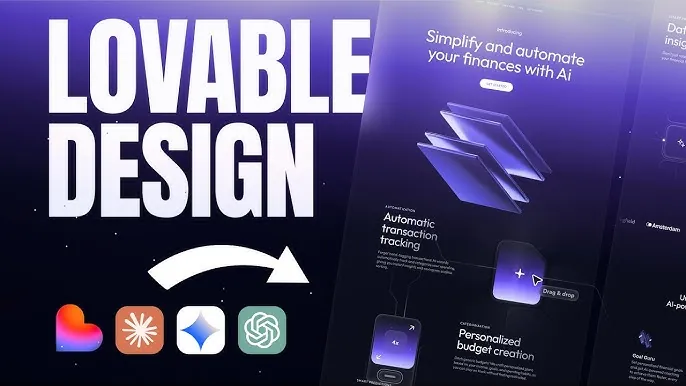
Lovable targets software product managers and full-stack creators by generating functional web applications from simple text prompts. Users can input product feature lists or upload screen design references, and the platform builds responsive frontend interfaces alongside basic backend database connections.
It features natural language code editing, allowing non-technical managers to request layout adjustments or bug fixes without editing raw code manually. While Lovable excels at producing working digital MVPs, it is strictly a web application builder and does not support physical product design or hardware development workflows.
- Output type: Production-ready Web app code, live application deployments.
- Editability: Natural language code edits, GitHub repository sync.
- Export formats: GitHub code export, hosted web links.
- Commercial usage: User retains full ownership of generated codebases.
- Batch support: Generates complete web application structures in one run.
- Integration/API: Supabase database integration, custom API webhooks, GitHub.
- Price tier: Free tier with generation limits; Pro plans from $50/month.
Pros:
- Builds working full-stack web applications in minutes.
- Seamless sync with GitHub allows technical teams to extend generated code easily.
- Supports natural language updates for quick frontend fixes.
Cons:
- Limited to web browser applications without native mobile support.
- Irrelevant for physical hardware ideation, product rendering, or 3D prototyping.
Webflow AI – Best for Visual Web Layouts & Web Deployment
Webflow AI brings generative capabilities to visual web development, helping teams generate landing page layouts, copy variations, and UI components inside Webflow’s visual editor. It allows designers to go from initial site wireframes to published web pages without writing custom code, while maintaining full control over responsive CSS styling.
The platform is designed for marketing teams, e-commerce brand managers, and digital product designers launching customer-facing pages. However, Webflow AI functions exclusively within visual web design. It offers no tools for hardware development, physical product modeling, or manufacturing workflows.
- Output type: HTML/CSS web components, CMS structure layouts.
- Editability: Drag-and-drop visual layout editor, style panel adjustments.
- Export formats: Published web domain, custom HTML/CSS code export.
- Commercial usage: Included with paid site plans.
- Batch support: Modular component-level generation.
- Integration/API: Extensive REST API, webhooks, app integrations.
- Price tier: Free starter plan; paid plans range from $14 to $39/month.
Pros:
- Produces clean, responsive web code optimized for live deployment.
- Combines generative speed with granular visual CSS design controls.
- Built-in content management system simplifies ongoing site updates.
Cons:
- Steep learning curve for users unfamiliar with standard CSS box model concepts.
- Has no capability for generating physical product visual renders or 3D CAD assets.
Uizard – Best for Fast Hand-Drawn Sketch Digitization & UI Mockups
Uizard focuses on helping non-designers and early-stage founders turn rough ideas into digital UI mockups. Its standout feature digitizes hand-drawn paper sketches uploaded via camera, converting drawn shapes and text into editable screen wireframes.
Users can transform low-fidelity wireframes into high-fidelity interactive prototypes using pre-built UI theme templates. Uizard works well for rapid internal team presentations, but its output lacks the design system depth required by advanced UI designers and offers no capabilities for physical product development.
- Output type: Digitized UI wireframes, clickable screen prototypes.
- Editability: Drag-and-drop screen component editor, AI style preset application.
- Export formats: PNG, PDF, Figma file export.
- Commercial usage: Available on paid subscription tiers.
- Batch support: Converts uploaded multi-sketch images into screen flows.
- Integration/API: Figma export integration.
- Price tier: Free plan; paid subscriptions range from $12 to $39/month.
Pros:
- Converts paper sketches into editable digital wireframes quickly.
- Accessible interface tailored for non-technical founders and product teams.
- Speeds up early screen concept testing before committing designer resources.
Cons:
- Component customization options are less flexible than dedicated design suites like Figma.
- Exclusively built for software screens, with no hardware design or manufacturing support.
Key Industry Trends in AI Product Design (2026)
Understanding how the broader market uses generative software helps product teams select tools that fit long-term workflows. Recent developments highlight three clear operational shifts:
1. Shift Toward Agentic AI Workflows
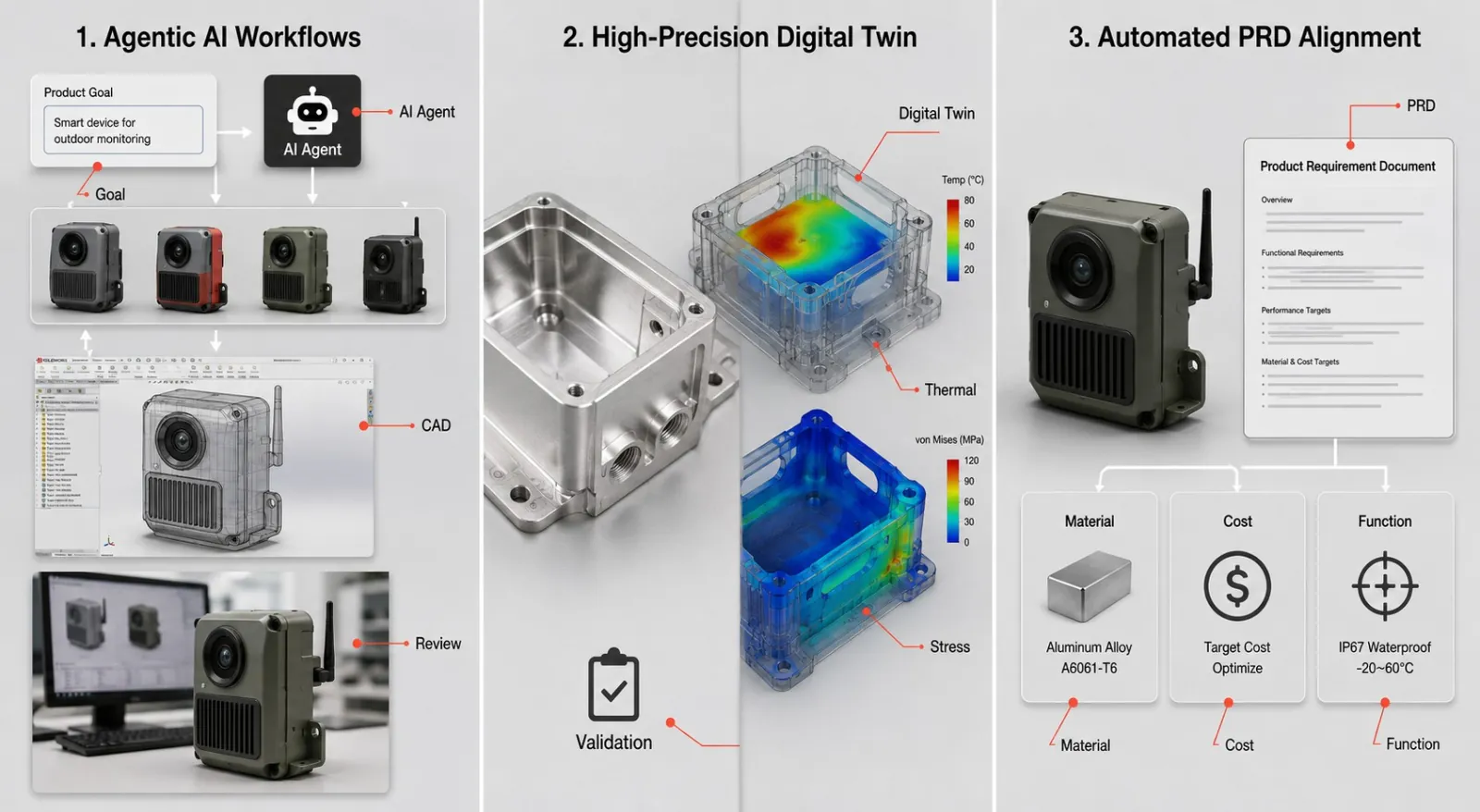
The industry is moving beyond basic prompt-to-image generators toward agentic AI frameworks capable of managing complex, multi-step tasks. Modern tools deconstruct high-level product goals into structured requirements, query design systems, generate multi-angle concepts, and check layout rules automatically.
2. High-Precision Digital Twin Simulation
Generative design tools are increasingly incorporating physics-based pre-validation before physical samples are ordered. Integrating digital twin simulations early allows hardware creators to test structural load points, thermal behavior, and ergonomic fit virtually. This reduces physical iteration cycles and lowers prototype scrap rates.
3. Automated PRD and Engineering Alignment
Visual generation alone rarely provides enough context for production teams. AI product design workflows now pair visual generation directly with structured Product Requirement Documents (PRDs). Automating specification drafting ensures material selections, targeted cost structures, and functional criteria stay aligned with visual renders from day one.
Buying Guide: How to Evaluate Product Design AI Software
Selecting the right AI platform depends on your team’s specific role and workflow requirements. Consider these primary evaluation criteria:
- Physical vs. Digital Target Focus: Determine whether your primary output is digital screens (UI/UX tools like UX Pilot or Uizard) or physical products (SHBD Metal AI Creator or Vizcom).
- Multi-Angle Visual Consistency: Verify whether the tool maintains consistent form factor details across multiple camera angles and product variations.
- 3D Export Capabilities: Check if the platform outputs usable 3D formats (STL, GLB, OBJ) rather than flat 2D raster images alone.
- Commercial Usage Rights: Ensure the platform’s terms grant full commercial ownership of generated outputs for production, advertising, and retail sales.
- Downstream Manufacturing Integration: Evaluate whether the platform offers a direct path to physical prototyping or requires rebuilding the asset in external CAD applications.
FAQs
AI product design tools use artificial intelligence to assist in creating, visualizing, and validating product concepts — from text-to-image generation for visual renders to AI-powered 3D model conversion, DFM analysis, and manufacturing cost estimation. They range from simple render generators to full creation-to-production platforms like AI Creator.
Artistic tools like Midjourney focus on creating visually engaging, stylized imagery without regard for geometry or physical dimensions. Product design AI tools focus on visual consistency, functional specifications, structural feasibility, and exporting assets that fit professional engineering workflows.

Comment
0 comments
Got thoughts or experiences to share? We’d love to hear from you!